
Per platform
| iPhone and iPad | High fidelity | |
|---|---|---|
| Android | High fidelity |
How it works
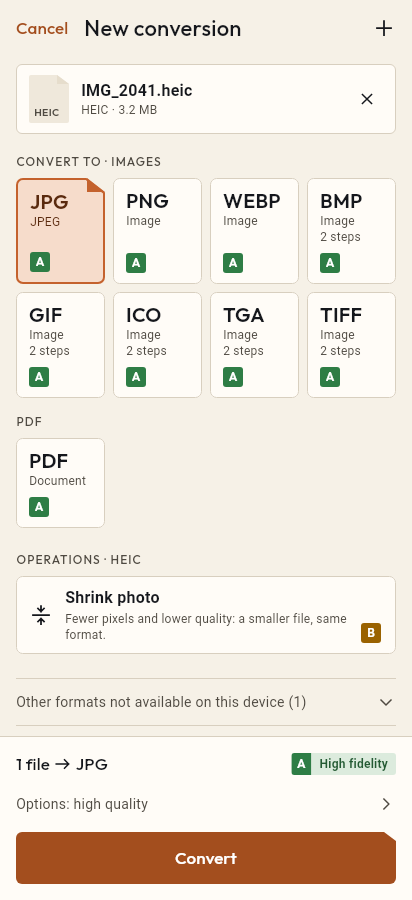
- Import the WEBP file, or share it with Tramuta.
- Pick JPG among the formats.
- Tap “Convert”, then “Share” or “Save to…”.
Save a picture from a website and you often end up with a .webp file. Your browser shows it, but an upload form, an older program or the photo kiosk at the shop may not. Tramuta converts it to JPG on your own device, with no online converter in between.
What carries over from WebP to JPG
On iPhone, iPad and Android the conversion is “High fidelity”: the system decodes the image and writes it again as JPEG at the quality you choose, at the same pixel size. Two limits come from the JPEG format itself, not from the app:
- no transparency: a WebP with transparent areas loses them in JPG;
- no animation: an animated WebP keeps only its first frame.
If either matters, WebP to PNG keeps transparency, and an animated WebP can go to GIF or MP4 instead.
WebP to JPG on iPhone and iPad, and on Android
- On iPhone and iPad, ImageIO reads the WebP and the same system engine writes the JPG.
- On Android, ImageDecoder reads it and Android’s encoder writes it; the output has no EXIF metadata.
- On both, any orientation stored in the file is applied to the pixels.
Options for WebP → JPG
- “Quality”: 1 to 100, default 90. A lower value gives a lighter JPG.
- “Max width” and “Max height”: scale the image down in proportion, never up.
- “Remove metadata” (iPhone and iPad only): on by default; switch it off to keep the file’s data.
Converting WebP to JPG in Tramuta, step by step
- Tap “Choose or drop files” and pick the WebP from Files or your downloads, or share it to Tramuta.
- Under “Convert to”, pick JPEG.
- Open “Options” if you want a different quality or size.
- Tap “Convert”.
- Use “Share”, “Save to…” or “Open in…” to take the JPG where it needs to go.
For iPhone photos there is HEIC to JPG, for AVIF images AVIF to JPG, and to slim down a PNG PNG to JPG.
Questions
What happens to an animated WebP converted to JPG?
JPEG is a still format, so Tramuta uses only the first frame of the animation. To keep the motion, convert the animated WebP to GIF or MP4 instead of JPG.
My WebP has a transparent background: how does it look as JPG?
JPEG has no transparency channel, so transparent areas don’t stay transparent, and the app doesn’t let you pick a background color. If you need transparency, choose PNG as the target.
Why won’t a website or program open my WebP file?
WebP was designed for web pages, and not every program, upload form or older system reads it. The JPG you get from Tramuta is accepted almost everywhere.
Free on iPhone, iPad and Android
No ads, no in-app purchases, no account.
-
App Store
iPhone and iPad, iOS 15.0 or later.
Coming to the App Store -
Google Play
Android 7.0 or later.
Coming to Google Play -
APK for Android
Android 7.0 or later, without Google Play.
The APK is not available yet.