
Per platform
| iPhone and iPad | High fidelity | |
|---|---|---|
| Android | High fidelity |
How it works
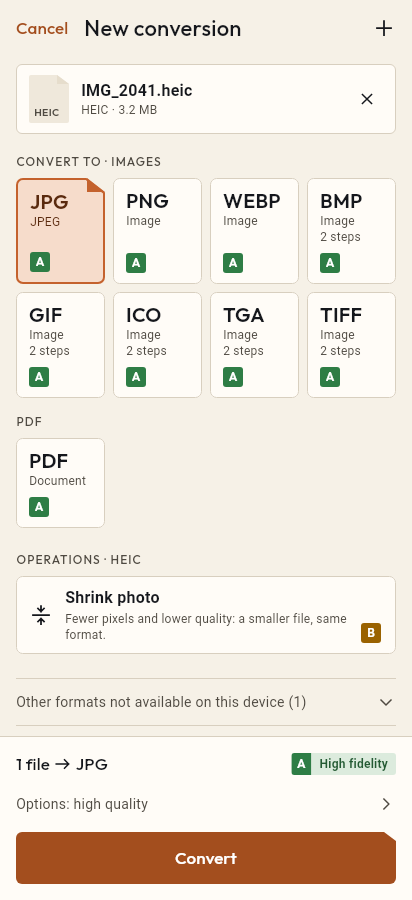
- Import the HEIC file, or share it with Tramuta.
- Pick PNG among the formats.
- Tap “Convert”, then “Share” or “Save to…”.
PNG is the format to use when a photo has to go through an image editor, a design tool or a slide deck without being recompressed every time it’s saved. Starting from an iPhone HEIC, Tramuta decodes the shot on your device and saves it as a lossless PNG, without sending it to a conversion website.
What changes from HEIC to PNG
The conversion is “High fidelity” on iPhone, iPad and Android. The pixels decoded from the HEIC go into the PNG with no further loss and at the original size, unless you set a limit. The practical side effect is file size: a PNG of a detailed photo is much larger than the original HEIC, and larger than a JPG too. If you only need to send the photo or upload it to a form, HEIC to JPG gives lighter files.
HEIC to PNG: iPhone and iPad versus Android
- On iPhone and iPad the work is done by ImageIO, the system image engine.
- On Android, ImageDecoder reads HEIC photos from Android 9, and Android’s encoder writes the PNG. On older versions the conversion isn’t available.
- On Android the PNG never carries EXIF metadata; on iPhone and iPad you decide whether to keep it.
Useful options for HEIC → PNG
- “Max width” and “Max height”: in pixels, they shrink the photo in proportion and never enlarge it. This is how you get a lighter PNG.
- “Remove metadata” (iPhone and iPad only): on by default, it strips GPS location, camera data and the color profile.
- “Quality” doesn’t appear: PNG is always written losslessly.
Steps to turn HEIC into PNG with Tramuta
- Tap “Choose or drop files” and pick the HEIC photos, or send them to Tramuta with Share or “Open in…”.
- Under “Convert to”, pick PNG.
- In “Options”, set the maximum size and, on iPhone and iPad, the metadata choice if you need to.
- Tap “Convert”.
- Keep the result with “Save to…” or send it with “Share”.
To collect your shots in a document, use HEIC to PDF. If you start from images downloaded from the web, WebP to PNG works the same way; for JPG files there is JPG to PNG.
Questions
Why is the PNG so much larger than the HEIC photo?
HEIC uses efficient lossy compression, while PNG stores every pixel losslessly. The same shot as PNG therefore takes far more space: that is the price of a file that loses nothing more each time you edit it.
Where is the “Quality” option for PNG?
For PNG it doesn’t appear at all. Quality applies to lossy formats such as JPEG; PNG is always written losslessly. To make it smaller, reduce its size with “Max width” and “Max height”.
Does converting HEIC to PNG improve the photo?
No: PNG keeps the pixels exactly as they come out of the HEIC decoder, it doesn’t add detail. What it does is avoid further losses if you then edit or crop the image several times.
Free on iPhone, iPad and Android
No ads, no in-app purchases, no account.
-
App Store
iPhone and iPad, iOS 15.0 or later.
Coming to the App Store -
Google Play
Android 7.0 or later.
Coming to Google Play -
APK for Android
Android 7.0 or later, without Google Play.
The APK is not available yet.