
Convert PPTX to PDF on iPhone and iPad
Yes on iPhone and iPad, without uploading the file. Not available on Android.
Per platform
| iPhone and iPad | Best effort | What you lose: Slides come two per page and without their frame: it does not look like PowerPoint. |
|---|---|---|
| Android | Not available | On Android, presentations can’t be laid out on the device. |
How it works
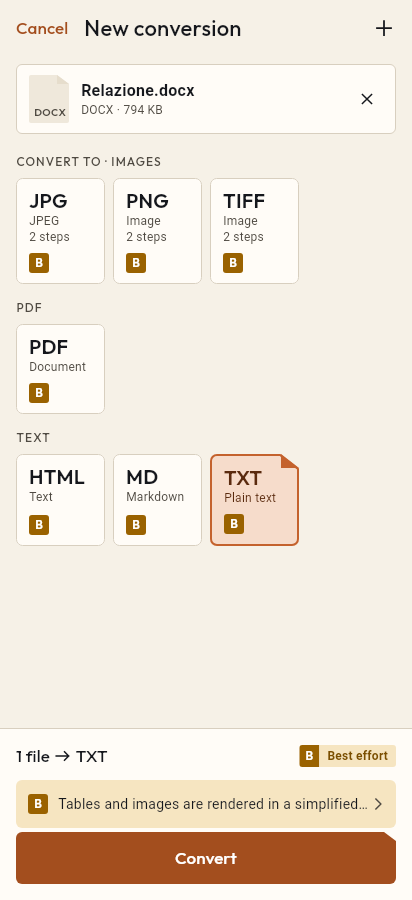
- Import the PPTX file, or share it with Tramuta.
- Pick PDF among the formats.
- Tap “Convert”, then “Share” or “Save to…”.
Sending a presentation as a PDF avoids surprises: the recipient opens it without PowerPoint or missing fonts, and can’t change it by accident. On iPhone and iPad, Tramuta converts a PPTX file to PDF on the device, without uploading it. On Android this conversion doesn’t exist, and the reason is explained below.
PPTX to PDF on iPhone and iPad: the system renderer
On iPhone and iPad, the iOS document renderer opens the presentation and Tramuta prints it to PDF. The renderer works with the network blocked, so nothing is fetched from the internet while printing. Fidelity is “Best effort”, with this note: “Slides come two per page and without their frame: it does not look like PowerPoint.”
In practice the PDF is fine for reading and sharing what the slides say, less so for projecting them: each page holds two, and the slide border is gone. Animations, transitions and videos have no equivalent in a PDF. Printing has a 60-second limit; a very heavy deck may not finish in time, and Tramuta tells you if that happens.
Why not on Android
On Android the conversion shows as unavailable, with its reason: “On Android, presentations can’t be laid out on the device.” Android has no system renderer for presentation files, and in this version Tramuta has no PPTX reader of its own. Sending the file to a server would get around it, but Tramuta doesn’t use the network. If you made the presentation yourself, the app you made it with may be able to export a PDF.
Options
None: the system renderer decides the page format.
How to do it in Tramuta on iPhone and iPad
- Tap “Choose or drop files” and pick the PPTX, or open it from Mail or Files with Share or “Open in…”.
- Under “Convert to”, pick PDF.
- Tap “Convert”.
- Use “Share”, “Save to…” or “Open in…”.
For text documents there is DOCX to PDF, for spreadsheets XLSX to PDF, both on Android too. Handing in slides and documents together? Merge PDFs puts them in a single file.
The two formats
-
PowerPoint PPTX
Extensions: .pptx
-
PDF
Extensions: .pdf
Questions
Why can’t I convert PPTX to PDF on Android?
Because “On Android, presentations can’t be laid out on the device.” Android has no system renderer for presentations, and Tramuta, which uses no online services, has no other route in this version.
Why are there two slides per page?
That is how the iOS system renderer prints presentations: two slides per page, without their frame. That is why fidelity is “Best effort”.
Can I convert PPT or Keynote files too?
On iPhone and iPad, yes: PPT and Keynote also go through the system renderer, with best-effort fidelity. On Android, no.
Are there any options to set?
No. The system renderer decides the page format, so the conversion starts without any choices to make.
Free on iPhone, iPad and Android
No ads, no in-app purchases, no account.
-
App Store
iPhone and iPad, iOS 15.0 or later.
Coming to the App Store -
Google Play
Android 7.0 or later.
Coming to Google Play -
APK for Android
Android 7.0 or later, without Google Play.
The APK is not available yet.