
Recognize text (OCR) in PDFs
Yes, on iPhone, iPad and Android, without uploading the file.
Per platform
| iPhone and iPad | Best effort | What you lose: Recognized text may contain errors: accuracy is not guaranteed on difficult scans. |
|---|---|---|
| Android | Best effort | What you lose: Recognized text may contain errors: accuracy is not guaranteed on difficult scans. |
How it works
- Import the PDFs, or share them with Tramuta.
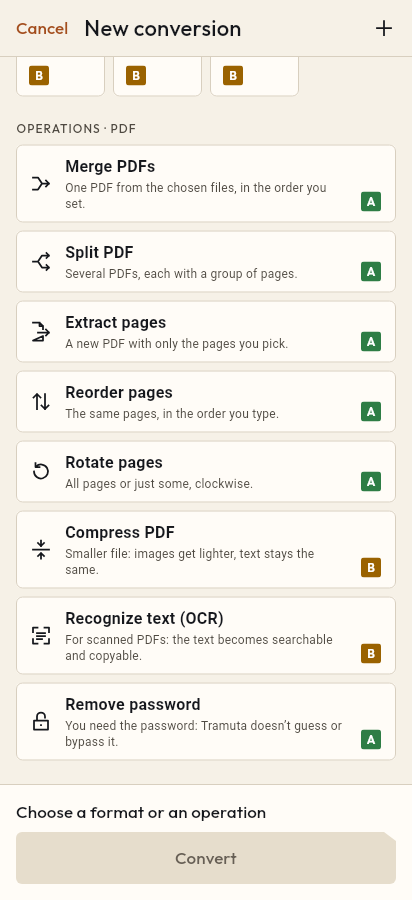
- Pick “Recognize text (OCR)” among the operations.
- Tap “Convert”, then “Share” or “Save to…”.
A scan is a stack of photographs: you can read it, but you can’t search it for a word, copy an address or paste a paragraph into an email. “Recognize text (OCR)” reads the pages and pulls out the text, in Italian and English, on your phone, tablet or foldable. The pages are not uploaded anywhere, which is the whole point for documents such as contracts, medical reports or payslips.
What to expect from text recognition (OCR)
OCR is “Best effort” on iPhone, iPad and Android, and the app says so before it starts: “Recognized text may contain errors: accuracy is not guaranteed on difficult scans.” It is worth reading the recognized text before you rely on it, especially when the scan is crooked or blurry.
You can choose between two results:
- “Searchable PDF”: a new PDF with one page for each recognized page, the same size as the original. Underneath is the image of the page, on top an invisible text layer: selections and searches land on the words you see. In the invisible layer, characters its font can’t hold are replaced; the image still shows the original. The file comes out with “searchable” in its name.
- “Text only (TXT)”: just the text, page after page, separated by a blank line. A page with nothing to read stays empty, so you can see where recognition found no text.
iPhone and iPad, Android: two engines, no network
On iPhone and iPad the text is recognized by Vision, Apple’s engine built into the system. On Android, Tesseract does the work, with the Italian and English models included in the app. Google’s ML Kit was left out on purpose, because it would send usage data to Google. In both cases PDFium first renders each page as an image, then hands it to the engine, one page at a time.
The recognition options
- “Text languages”: “Italian and English” (default), “Italian”, “English”.
- “Recognition resolution”: 200 to 400 DPI, default 300. Higher reads small print better, but takes longer.
- “Pages”: empty means all, or ranges such as 1-3, 5, 8-.
- “PDF password”: only if the PDF is protected. Tramuta doesn’t save it.
- “Result”: “Searchable PDF” or “Text only (TXT)”.
How to OCR a PDF in Tramuta
- Open Tramuta and tap “Choose or drop files”, or send the scan with “Share” or “Open in”.
- Under “Operations · PDF”, tap “Recognize text (OCR)”.
- In “Options”, pick languages, resolution and “Result”.
- Tap “Recognize”.
- From the result: “Share”, “Save to…” or “Open in…”.
If the pages are turned, straighten them first with Rotate pages. A heavy searchable PDF can be made lighter afterwards with Compress PDF. For a PDF that already has real text, use PDF to TXT.
Questions
Which languages does it recognize?
Italian and English, together or separately: in “Text languages” choose “Italian and English”, “Italian” or “English”. With the right language, recognition makes fewer mistakes.
Does the searchable PDF look like the scan?
Yes: each page is the image of the original page, with an invisible text layer on top for searching and copying. Pages with nothing to read stay image only.
Does OCR need a connection?
No. On iPhone and iPad recognition is done by Vision, the system engine; on Android by Tesseract, with the Italian and English models already inside the app. The pages never leave the device.
My PDF already has selectable text: should I use OCR?
Usually not. For a PDF with real text, “PDF to TXT” is the better fit: it reads the text as it is, with no recognition errors and without turning pages into images.
Free on iPhone, iPad and Android
No ads, no in-app purchases, no account.
-
App Store
iPhone and iPad, iOS 15.0 or later.
Coming to the App Store -
Google Play
Android 7.0 or later.
Coming to Google Play -
APK for Android
Android 7.0 or later, without Google Play.
The APK is not available yet.