
Per platform
| iPhone and iPad | High fidelity | |
|---|---|---|
| Android | High fidelity |
How it works
- Import the PDFs, or share them with Tramuta.
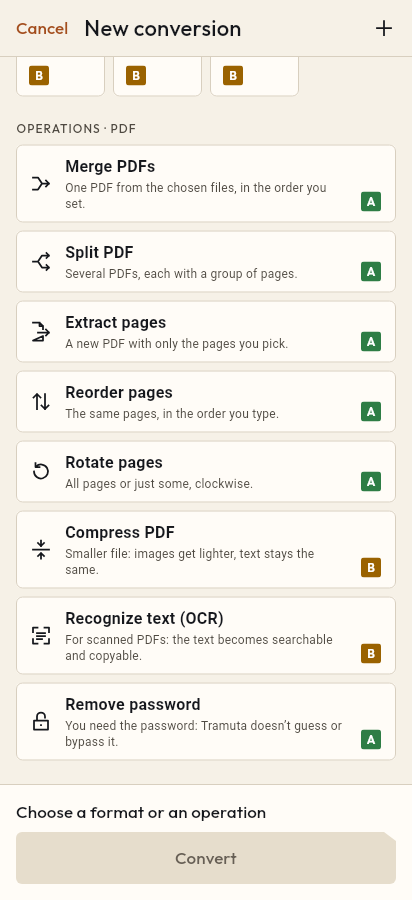
- Pick “Rotate pages” among the operations.
- Tap “Convert”, then “Share” or “Save to…”.
Scans taken with the phone held sideways, a landscape form in the middle of portrait pages, a PDF that came out of the office printer upside down: one badly turned page is enough to make a document awkward to read on screen. “Rotate pages” turns every page or only the ones you name, on your device and without sending the file to an online service.
What changes when you rotate PDF pages
Rotation is “High fidelity” on iPhone, iPad and Android. Tramuta doesn’t redraw the page: it changes the rotation the PDF itself declares for that page. Text, graphics and images stay identical, with no recompression and no loss of sharpness. Pages you didn’t list are not touched. On both platforms the work is done by PDFium.
The Rotate pages options: “Rotation” and “Pages”
- “Rotation”: 90°, 180° or 270°, always clockwise. The default is 90°.
- “Pages”: which pages to turn. Empty means “All pages”; otherwise numbers and ranges separated by commas, for example 1-3, 5, 8- (8- means from page 8 to the end). A page that doesn’t exist or a backwards range stops the conversion with an error.
One pass uses one angle. If you need 90° for some pages and 270° for others, run two passes in a row with “Continue with these files”.
How to rotate pages in Tramuta
- Open Tramuta and tap “Choose or drop files”, or send the PDF to Tramuta with “Share” or “Open in”.
- Under “Operations · PDF”, tap “Rotate pages”.
- In “Options”, pick the “Rotation” and, if needed, the “Pages”.
- Tap “Rotate”.
- The rotated PDF is ready: “Share”, “Save to…” or “Open in…”.
If the pages are out of place as well as turned, use Reorder pages. Once straightened, a scan can go on to Recognize text (OCR) to make its text searchable.
Questions
Which way do the pages turn?
Always clockwise. To turn a page a quarter counterclockwise, choose 270°; to fix an upside-down page, 180°.
Can I rotate a single page?
Yes: type its number in “Pages”, for example 2. Pages you don’t list stay as they are. With the field empty, every page turns.
Does rotating lower the quality of scans?
No. Tramuta changes the orientation the PDF declares for the page, without recompressing images or redrawing text.
Can different pages get different angles?
One pass uses one angle. For two angles, rotate one group of pages, then use “Continue with these files” to rotate the other group on the result.
Free on iPhone, iPad and Android
No ads, no in-app purchases, no account.
-
App Store
iPhone and iPad, iOS 15.0 or later.
Coming to the App Store -
Google Play
Android 7.0 or later.
Coming to Google Play -
APK for Android
Android 7.0 or later, without Google Play.
The APK is not available yet.